Deploy Services using Ansible (configuration management and application deployment)
You will learn how to install and configure a gateway using Ansible.
Playbook
Clone the “roq-ansible” project
$ git clone https://github.com/roq-trading/roq-ansible
Change directory
$ cd roq-ansible
Conda
Note
Conda is not required. However, you can find the most recent version of Ansible on conda-forge. This version is more likely to be compatible with recent software, e.g. Ubuntu 26.04.
Download Miniforge
$ curl -L -O "https://github.com/conda-forge/miniforge/releases/latest/download/Miniforge3-$(uname)-$(uname -m).sh"
Install Conda (does NOT require root access!)
$ bash Miniforge3-Linux-x86_64.sh -b -p opt/conda
Activate Conda’s root environment
$ source opt/conda/bin/activate
Create a new virtual environment
$ conda create -y -n test
Activate the new environment
$ conda activate test
Install Ansible
$ conda install -y ansible
Install the toml Python package (required by Roq’s playbook)
$ conda install -y toml
Workstation
Here we demonstrate how to configure and install a single gateway on your workstation using systemd’s user scope (which doesn’t require root access).
Important
In the following, please replace with your specific credentials everywhere you find MY_…
Create an inventory file named “inventory.yml”
ungrouped:
  hosts:
    workstation:
      ansible_host: localhost
      ansible_user: MY_USER_ID
Create your configuration in “host_vars/workstation.yml”
# systemd is your operating system's service manager
#
# a workstation normally has two scopes: system and user
# a server normally has only a single scope: system

systemd:
  scope: user  # systemctl --user

# shared roq configuration
#
# notice groups of flags
# each group is being saved into a separate flagfile

roq:
  auth:
    public_key: MY_ROQ_PUBLIC_KEY
    secret_key: MY_ROQ_SECRET_KEY
  flags:
    log:
      log_verbosity: 0
    loop:
      loop_sleep: 500ns
    gateway:
      auth_keys_file: '{{ config_user.config_dir }}/shared/keys.json'
      cache_dir: '{{ config_user.cache_dir }}'
      event_log_dir: '{{ config_user.data_dir }}'
      download_trades_lookback: 5m
      download_trades_lookback_on_restart: 24h

# conda based services
#
# notice that each service specifies both a conda environment and a package name
# this gives you fine-grained control of each package in your deployment
#
# notice the two kinds of flags: shared and custom
# shared flags refer back to the previous group and use --flagfile includes
# the gateway's custom flags are always defined AFTER the shared flags
# abseil will choose the LAST defined flag => custom flags therefore take precedence
#
# finally, the gateway's config file is being auto-generated from this yaml

conda:
  services:
    deribit:  # unique service name, also used with systemd
      systemd:
        description: deribit gateway
      conda:
        env: unstable
        package: roq-deribit
      client_listen_address:
        type: unix  # note! use unix for gateways and tcp for e.g. fix-bridge
      flags:
        package: test
        shared:
          - log
          - loop
          - gateway
        custom:
          loop_cpu_affinity: 1  # pin this service to core #1
      config:
        symbols:
          - ^BTC(_USD[A-Z]?)?-PERPETUAL$
          - ^ETH(_USD[A-Z]?)?-PERPETUAL$
        accounts:
          A1:
            login: MY_DERIBIT_LOGIN
            secret: MY_DERIBIT_SECRET
            symbols: .*
            master: true
        users:
          service-manager:
            password: secret
          trader:
            password: secret
            accounts: A1
            symbols: BTC-PERPETUAL

    # roq's service manager
    #
    # offers a web interface which can be used to control gateways and other services
    # aggregates gateway metrics so Prometheus only needs to scrape this service

    service-manager:
      systemd:
        description: service manager
      conda:
        env: unstable
        package: roq-service-manager
      client_listen_address:
        type: tcp
        port: 2345
        interface: localhost
      flags:
        shared:
          - log
        custom: {}
      config: {}  # note! special
We can now install the services
$ ansible-playbook -i inventory.yml site.yml
We can control the service-manager service like this
$ systemctl --user restart service-manager.service
The web interface is now accessible from http://localhost:2345/roq/
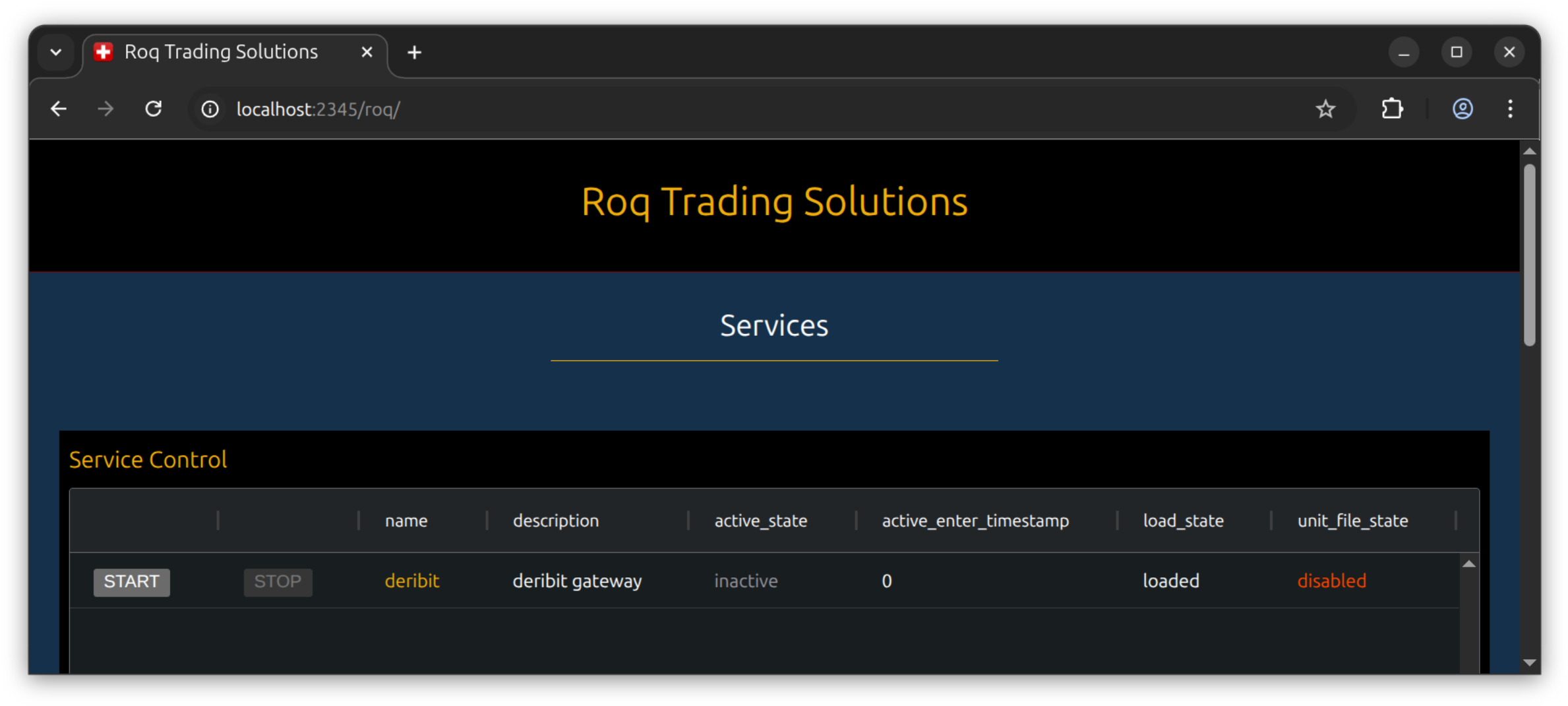
Let’s find some of the files generated by the script.
The service file
$ cat ~/.config/systemd/user/deribit.service

# !!! THIS FILE HAS BEEN AUTO-GENERATED !!!

[Unit]
Description=deribit gateway
Wants=network.target
After=network-online.target
StartLimitIntervalSec=60
StartLimitBurst=2

[Service]
Type=notify
Restart=on-failure
RestartSec=10
TimeoutStopSec=10
WatchdogSec=10
ExecStartPre=+/bin/mkdir -p /run/user/1000/roq/client /run/user/1000/roq/service
ExecStartPre=+/bin/chmod -R 0770 /run/user/1000/roq
ExecStartPre=+/bin/mkdir -p /home/thraneh/.local/state/roq /home/thraneh/.local/share/roq
ExecStart=/home/thraneh/.local/share/conda/envs/unstable/bin/roq-deribit \
  --flagfile /home/thraneh/.local/share/conda/envs/unstable/share/roq-deribit/flags/test/flags.cfg \
  --flagfile /home/thraneh/.config/roq/shared/log.cfg \
  --flagfile /home/thraneh/.config/roq/shared/loop.cfg \
  --flagfile /home/thraneh/.config/roq/shared/gateway.cfg \
  --flagfile /home/thraneh/.config/roq/services/deribit/flags.cfg \
  --config_file /home/thraneh/.config/roq/services/deribit/config.toml \
  --service_listen_address unix:///run/user/1000/roq/service/deribit.sock \
  --name deribit

[Install]
WantedBy=multi-user.target
In this service file you can find the paths for all relevant include files.
As an example, you can compare one of the included flagfiles with the yaml script above
$ cat /home/thraneh/.config/roq/shared/gateway.cfg

# !!! THIS FILE HAS BEEN AUTO-GENERATED !!!

--auth_keys_file=/home/thraneh/.config/roq/shared/keys.json
--cache_dir=/home/thraneh/.local/state/roq
--event_log_dir=/home/thraneh/.local/share/roq
--download_trades_lookback=5m
--download_trades_lookback_on_restart=24h
The gateway can be controled from the web interface.
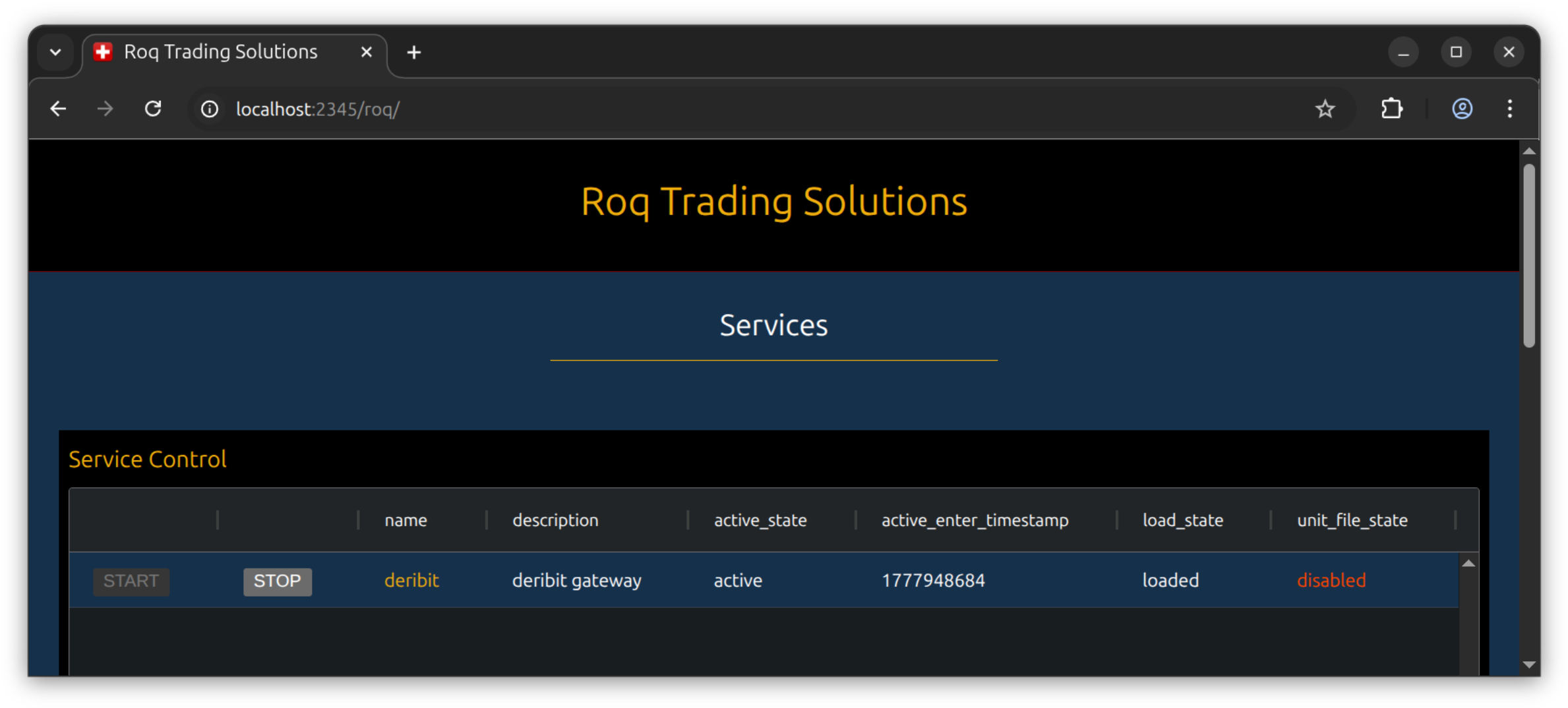
Or you can use the command-line to start the service
$ systemctl --user restart deribit
In either case, the log is available from journalctl
$ journalctl --user -u deribit

May 04 17:02:25 fv-wrk-01 systemd[6038]: Starting deribit.service - deribit gateway...
May 04 17:02:26 fv-wrk-01 roq-deribit[860176]: I0504 17:02:26.296695 860176 logging: async
May 04 17:02:26 fv-wrk-01 roq-deribit[860176]: I0504 17:02:26.296727 860176 L0 service.cpp:65] ===== START =====
May 04 17:02:26 fv-wrk-01 roq-deribit[860176]: I0504 17:02:26.296728 860176 L0 service.cpp:66] package name  : roq-deribit
May 04 17:02:26 fv-wrk-01 roq-deribit[860176]: I0504 17:02:26.296729 860176 L0 service.cpp:67] build version : 1.1.4
May 04 17:02:26 fv-wrk-01 roq-deribit[860176]: I0504 17:02:26.296729 860176 L0 service.cpp:68] build number  : 20260504
May 04 17:02:26 fv-wrk-01 roq-deribit[860176]: I0504 17:02:26.296729 860176 L0 service.cpp:69] build type    : Release
May 04 17:02:26 fv-wrk-01 roq-deribit[860176]: I0504 17:02:26.296730 860176 L0 service.cpp:70] git hash      : g57af827
May 04 17:02:26 fv-wrk-01 roq-deribit[860176]: I0504 17:02:26.296730 860176 L0 service.cpp:71] compile time  : May  4 2026 07:41:27
May 04 17:02:26 fv-wrk-01 roq-deribit[860176]: I0504 17:02:26.296731 860176 L0 service.cpp:72] host          : x86_64-conda-linux-gnu
May 04 17:02:26 fv-wrk-01 roq-deribit[860176]: I0504 17:02:26.296733 860176 L0 service.cpp:73] uname -v      : #14-Ubuntu SMP PREEMPT_DYNAMIC Mon Apr 13 11:09:53 UTC 2026
May 04 17:02:26 fv-wrk-01 roq-deribit[860176]: I0504 17:02:26.296734 860176 L0 service.cpp:74] uname -s      : Linux
May 04 17:02:26 fv-wrk-01 roq-deribit[860176]: I0504 17:02:26.296736 860176 L0 service.cpp:75] uname -r      : 7.0.0-14-generic
May 04 17:02:26 fv-wrk-01 roq-deribit[860176]: I0504 17:02:26.296740 860176 L0 service.cpp:76] cwd           : /home/thraneh
May 04 17:02:26 fv-wrk-01 roq-deribit[860176]: I0504 17:02:26.296741 860176 L0 service.cpp:77] pid           : 860176
[...]
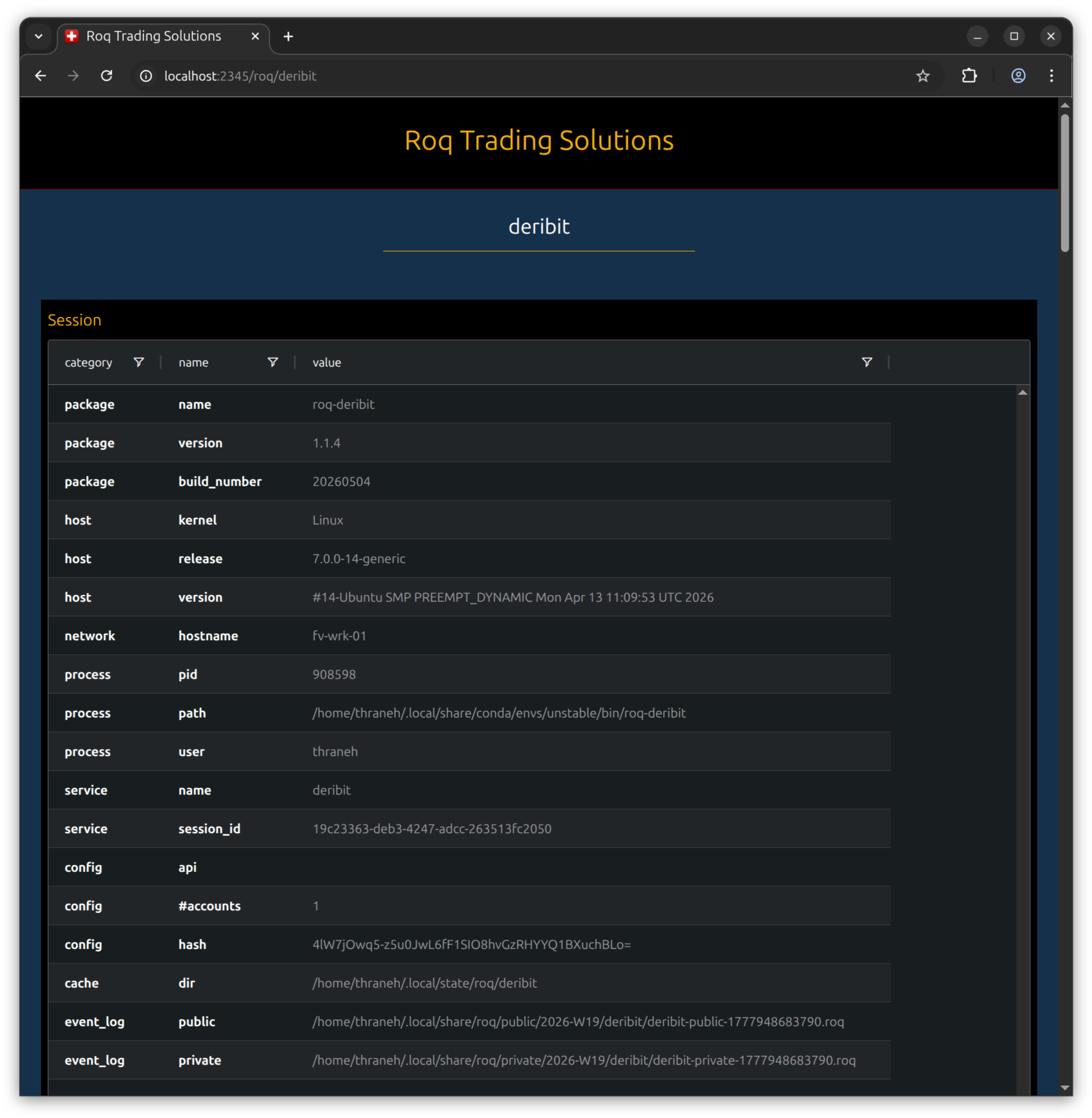
You will find realtime updating gateway information if you click on the gateway row in the web interface.
This is just the first part of the page
Server
With fewer explanations, we will now show a more complex server deployment.
Inventory (“inventory.yml”)
ungrouped:
  hosts:
    server:
      ansible_host: localhost
      ansible_user: MY_USER_ID
      # ansible_become_exe: sudo.ws  # note! ansible not be compatible with sudo-rs (ubuntu 26.04)
Host (“host_vars/server.yml”)
systemd:
  scope: system  # note!

roq:
  auth:
    public_key: MY_ROQ_PUBLIC_KEY
    secret_key: MY_ROQ_SECRET_KEY
  flags:
    log:
      log_verbosity: 0
    loop:
      loop_sleep: 500ns
    gateway:
      auth_keys_file: '{{ config_user.config_dir }}/shared/keys.json'
      cache_dir: '{{ config_user.cache_dir }}'
      event_log_dir: '{{ config_user.data_dir }}'
      download_trades_lookback: 5m
      download_trades_lookback_on_restart: 24h

conda:
  services:

    deribit:
      systemd:
        description: deribit gateway
      conda:
        env: unstable
        package: roq-deribit
      client_listen_address:
        type: unix
      flags:
        package: test
        shared:
          - log
          - loop
          - gateway
        custom:
          loop_cpu_affinity: 1
      config:
        symbols:
          - ^BTC(_USD[A-Z]?)?-PERPETUAL$
          - ^ETH(_USD[A-Z]?)?-PERPETUAL$
        accounts:
          A1:
            login: MY_DERIBIT_LOGIN
            secret: MY_DERIBIT_SECRET
            symbols: .*
            master: true
        users:
          service-manager:
            password: secret
          trader:
            password: secret
            accounts: A1
            symbols: BTC-PERPETUAL
          fix-bridge:
            password: secret
            accounts: A1
            symbols: BTC-PERPETUAL

    fix-bridge:
      systemd:
        description: fix bridge
      conda:
        env: unstable
        package: roq-fix-bridge
      client_listen_address:
        type: tcp  # note!
        port: 1234  # note!
        interface: localhost
      dependencies:
        - deribit  # note!
      flags:
        shared:
          - log
          - loop
        custom:
          loop_cpu_affinity: 2
      config:
        symbols:
          - [USD.*, BTC.*]
          - deribit:
              - BTC-PERPETUAL
              - ETH-PERPETUAL
        users:
          md1:
            component: test
            username: md1
          oe1:
            component: test
            username: oe1
            password: secret
            account: A1

    service-manager:
      systemd:
        description: service manager
      conda:
        env: unstable
        package: roq-service-manager
      client_listen_address:
        type: tcp
        port: 2345
        interface: localhost
      flags:
        shared:
          - log
        custom: {}
      config: {}  # note! special
Note
The “fix-bridge” service has a list of dependencies, in this case the “deribit” service. This is used to automatically generate the connection flags for the command-line.
Install
$ ansible-playbook -i inventory.yml site.yml --ask-become-pass
Important
You need the --ask-become-pass for privilege escalation.
Restart
$ sudo systemctl restart service-manager.service
Important
You need sudo for privilege escalation.
The gateway’s service file
$ cat /etc/systemd/system/deribit.service

# !!! THIS FILE HAS BEEN AUTO-GENERATED !!!

[Unit]
Description=deribit gateway
Wants=network.target
After=network-online.target
StartLimitIntervalSec=60
StartLimitBurst=2

[Service]
Type=notify
User=thraneh
Group=thraneh
Restart=on-failure
RestartSec=10
TimeoutStopSec=10
WatchdogSec=10
ExecStartPre=+/bin/mkdir -p /run/roq/client /run/roq/service
ExecStartPre=+/bin/chmod -R 0770 /run/roq
ExecStartPre=+/bin/mkdir -p /var/lib/roq/cache /var/lib/roq/data
ExecStart=/opt/conda/envs/unstable/bin/roq-deribit \
  --flagfile /opt/conda/envs/unstable/share/roq-deribit/flags/test/flags.cfg \
  --flagfile /usr/local/etc/roq/shared/log.cfg \
  --flagfile /usr/local/etc/roq/shared/loop.cfg \
  --flagfile /usr/local/etc/roq/shared/gateway.cfg \
  --flagfile /usr/local/etc/roq/services/deribit/flags.cfg \
  --config_file /usr/local/etc/roq/services/deribit/config.toml \
  --service_listen_address unix:///run/roq/service/deribit.sock \
  --client_listen_address unix:///run/roq/client/deribit.sock \
  --name deribit

[Install]
WantedBy=multi-user.target
The FIX-bridge’s service file
$ cat /etc/systemd/system/fix-bridge.service
# !!! THIS FILE HAS BEEN AUTO-GENERATED !!!

[Unit]
Description=fix bridge
Wants=network.target
After=network-online.target
StartLimitIntervalSec=60
StartLimitBurst=2

[Service]
Type=notify
User=thraneh
Group=thraneh
Restart=on-failure
RestartSec=10
TimeoutStopSec=10
WatchdogSec=10
ExecStartPre=+/bin/mkdir -p /run/roq/client /run/roq/service
ExecStartPre=+/bin/chmod -R 0770 /run/roq
ExecStartPre=+/bin/mkdir -p /var/lib/roq/cache /var/lib/roq/data
ExecStart=/opt/conda/envs/unstable/bin/roq-fix-bridge \
  /run/roq/client/deribit.sock \
  --flagfile /usr/local/etc/roq/shared/log.cfg \
  --flagfile /usr/local/etc/roq/shared/loop.cfg \
  --flagfile /usr/local/etc/roq/services/fix-bridge/flags.cfg \
  --config_file /usr/local/etc/roq/services/fix-bridge/config.toml \
  --service_listen_address unix:///run/roq/service/fix-bridge.sock \
  --client_listen_address tcp://localhost:1234 \
  --name fix-bridge

[Install]
WantedBy=multi-user.target
Note
The connection to the “deribit” service is the very first argument on the command-line.